프로젝트를 vercel로 배포를 하면서, 무료 플랜을 뜨다보니 배포 branch로의 merge는 버셀 계정의 소유주인 나만 가능하였다.
(버셀의 유료 플랜을 사용할 때에는 member를 추가하면 모두에게 merge 권한을 줄 수 있었다.)
우리는 gitflow 방식을 쓰고 있었는데, 각자의 기능 branch에서 develop 브랜치로 merge하였고, develop -> main(배포 브랜치)으로 merge하는 건 매일 오후 11시 59분에 병합의 자동화를 구축하고자 하였다.
.github파일에 workflows 파일을 만들고, auto-merge.yml을 만들었다.
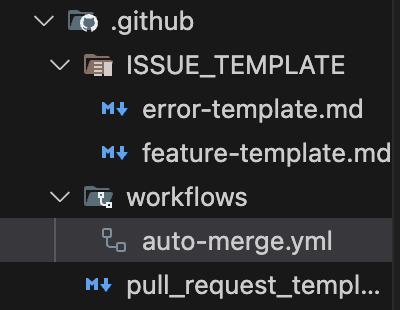
name: Auto Merge Develop to Main
on:
  schedule:
    - cron: '59 14 * * *'  # 한국시간 23:59 = UTC 14:59
  workflow_dispatch:
jobs:
  merge:
    runs-on: ubuntu-latest
    steps:
      - name: Checkout repository
        uses: actions/checkout@v4
      - name: Merge develop into main
        run: |
          git config --global user.name "github-actions[bot]"
          git config --global user.email "github-actions[bot]@users.noreply.github.com"
          git fetch origin
          git checkout main
          git merge origin/develop --no-edit || echo "Nothing to merge"

          git push origin main
        env:
          GITHUB_TOKEN: ${{ secrets.GITHUB_TOKEN }}
오후 11시 59분이 되자, 시도는 되었는데 실패했다는 메일이 왔다.


내용을 살펴보면,
- GitHub Actions 워크플로우가 main 브랜치에 develop 브랜치를 자동 병합하려 함.
- 하지만 에러: "remote: Write access to repository not granted."
- 이는 github-actions[bot]이 main 브랜치에 푸시할 권한이 없다.
다른 팀원들도 merge가 안 되는데, github-action봇이 할 수 있을 건 아니라고 예상은 했지만, 정말이었다.
내 token을 github에서 발급받고 그 토큰을 넣은 workflows를 새로 만들었다.
그 전에 앞서,
git config --global user.name "your-username"
git config --global user.email "your-email@example.com"
이 곳에 내 name과 email도 넣었고
토큰 발급은
https://github.com/settings/tokens
GitHub · Build and ship software on a single, collaborative platform
Join the world's most widely adopted, AI-powered developer platform where millions of developers, businesses, and the largest open source community build software that advances humanity.
github.com
개인 PAT 생성하기
- GitHub PAT 생성
- repo 권한 포함
- 생성한 토큰을 GitHub secrets에 저장 (PERSONAL_TOKEN 등)
- 워크플로우 수정:
name: Auto Merge Develop to Main

on:
  schedule:
    - cron: '59 14 * * *' # 한국시간 23:59 = UTC 14:59
  workflow_dispatch:

permissions:
  contents: write

jobs:
  merge:
    runs-on: ubuntu-latest
    steps:
      - name: Checkout repository
        uses: actions/checkout@v4

      - name: Merge develop into main
        run: |
          git config --global user.name "your-username"
          git config --global user.email "your-email@example.com"

          git remote set-url origin https://x-access-token:${{ secrets.PERSONAL_TOKEN }}@github.com/organization이름/Repo이름.git

          git fetch origin
          git checkout main
          git merge origin/develop --no-edit || echo "Nothing to merge"
          git push origin main
PAT를 GitHub Secrets에 등록
- GitHub 리포지토리로 이동
- Settings → Secrets and variables → Actions 클릭
- New repository secret 클릭
- 다음과 같이 입력:
- Name: PERSONAL_TOKEN
- Value: github_pat_11어쩌고저쩌고
- 저장
🔒 이 토큰은 절대로 직접 코드에 하드코딩하지 말고, 반드시 secrets를 통해 사용해야 함
Workflow permissions 설정
혹시 몰라 github organizations 에서의 권한도 수정해주었다.

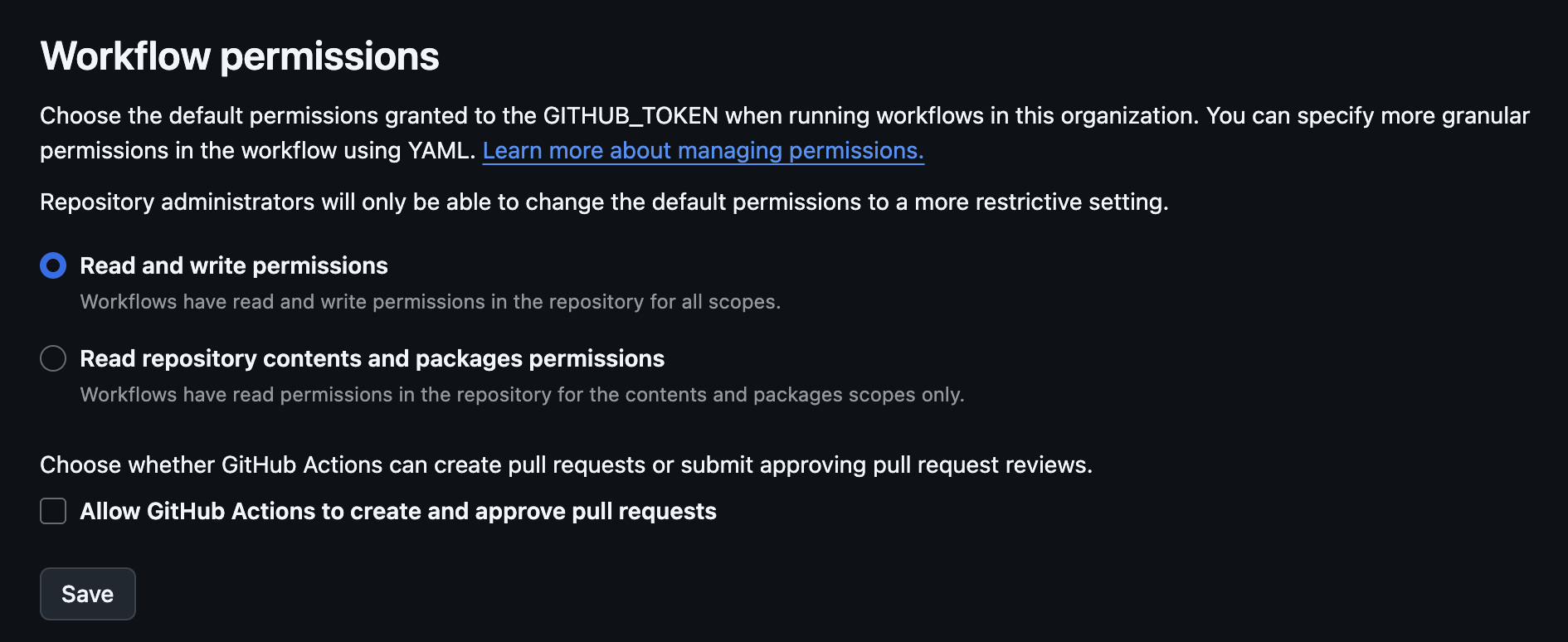
workflow 자체는 실행이 되는데 레포의 실제 main과 develop에 각 개발자들이 commit 한 부분이 반영이 되지 않았다고 했다.
PR open 시 main으로 merge Workflow를 만들었다.
name: Auto Merge PR from Develop to Main

on:
  pull_request:
    branches:
      - main
    types: [opened, synchronize, reopened]

permissions:
  contents: write
  pull-requests: write

jobs:
  auto-merge:
    if: github.event.pull_request.head.ref == 'develop'
    runs-on: ubuntu-latest
    steps:
      - name: Enable auto-merge
        uses: peter-evans/enable-pull-request-automerge@v3
        with:
          token: ${{ secrets.GITHUB_TOKEN }}
          merge-method: merge
          pull-request-number: ${{ github.event.pull_request.number }}
develop에서 main으로 PR를 열면 그게 누구든지 merge가 되게 하였다.
하지만 vercel에서는 내 commit이 없으면 반영이 안 되는 거 같다 ㅠ,ㅠ
유료 플랜을 쓸 게 아니라면 꼭 네리로 배포하자 ^.^
(이걸로 욕 좀 먹었다 ㅠㅠ)
'프론트엔드' 카테고리의 다른 글
| [FE] 프론트엔드 리액트 ts(타입스크립트)에서 GPT API 연결하기 (0) | 2025.05.29 |
|---|---|
| [FE] 축제 웹사이트 프론트엔드 회고 (0) | 2025.05.26 |
| [FE] CSS 스크롤바 감추기 (0) | 2025.05.02 |
| [FE] 프론트엔드 클라이언트 배포 비교 (0) | 2025.03.15 |
| [FE] React(리액트) 라우팅과 Next.js 파일 기반 라우팅의 비교 (0) | 2024.10.05 |


